
Blog
Google business listing guide for restaurants: boost local visibility
Complete guide to optimizing your restaurant's Google Business listing for maximum local visibility, more reservations, and higher customer engagement in 2026.

Google business listing guide for restaurants: boost local visibility
Restaurant owners know the challenge: potential customers search for a place to eat nearby, but your restaurant doesn’t appear in the top results. Meanwhile, competitors with optimized Google Business listings capture those diners. Your Google Business profile is often the first impression customers have of your restaurant, and an incomplete or outdated listing means lost revenue. This guide walks you through the essential steps to transform your Google Business listing into a powerful tool that drives reservations, orders, and foot traffic to your restaurant.
Table of Contents
- Key takeaways
- Preparing your Google Business listing: core information and settings
- Adding menus, ordering, and reservations to drive customer actions
- Effective review management for higher ratings and better reputation
- Maintaining and optimizing your listing for ongoing success
- How Sorbey can help optimize your restaurant’s Google Business listing
- FAQ
Key Takeaways
| Point | Details |
|---|---|
| Accurate NAP and hours | Complete and synchronize your restaurant name, address, phone, and hours across your website and listings to boost visibility and trust. |
| Menus with prices | Upload a complete menu with prices and photos through the Google Business Profile editor to help customers decide and reduce friction. |
| Online ordering and reservations | Enable ordering options and connect reservation platforms to streamline actions and increase bookings. |
| Verification and reviews | Verify your business to unlock editing capabilities and actively monitor and respond to reviews to boost ratings. |
Preparing your Google Business listing: core information and settings
Your restaurant’s foundation starts with accurate, complete business information. Google prioritizes listings that provide comprehensive details, and customers trust restaurants that display consistent information across all platforms. Complete all core info: accurate NAP, hours including special hours, attributes, and service options to ensure your listing performs optimally.
Start with your NAP: name, address, and phone number. These three elements must match exactly across your website, social media, and directory listings. Inconsistencies confuse Google’s algorithm and erode customer trust. Use the exact legal business name without adding keywords or promotional phrases.
Next, set detailed hours that reflect your actual service times. Include special hours for brunch service, happy hour, or late-night dining. Many restaurants lose customers by displaying only standard dinner hours when they actually serve lunch or weekend brunch. Update holiday hours at least two weeks in advance to prevent frustrated customers arriving at closed doors.
Attributes tell customers what makes your restaurant unique before they visit. Select options like outdoor seating, delivery, wheelchair accessibility, and Wi-Fi availability. These details help customers make informed decisions and filter search results. A family searching for wheelchair accessible restaurants won’t consider your establishment if you haven’t marked this attribute, even if you offer full accessibility.
Service options directly impact how Google displays your listing in different search contexts. Enable takeout, delivery, and dine-in options as appropriate. Customers searching specifically for delivery restaurants won’t see your listing if you haven’t enabled this option, even if you partner with delivery services.
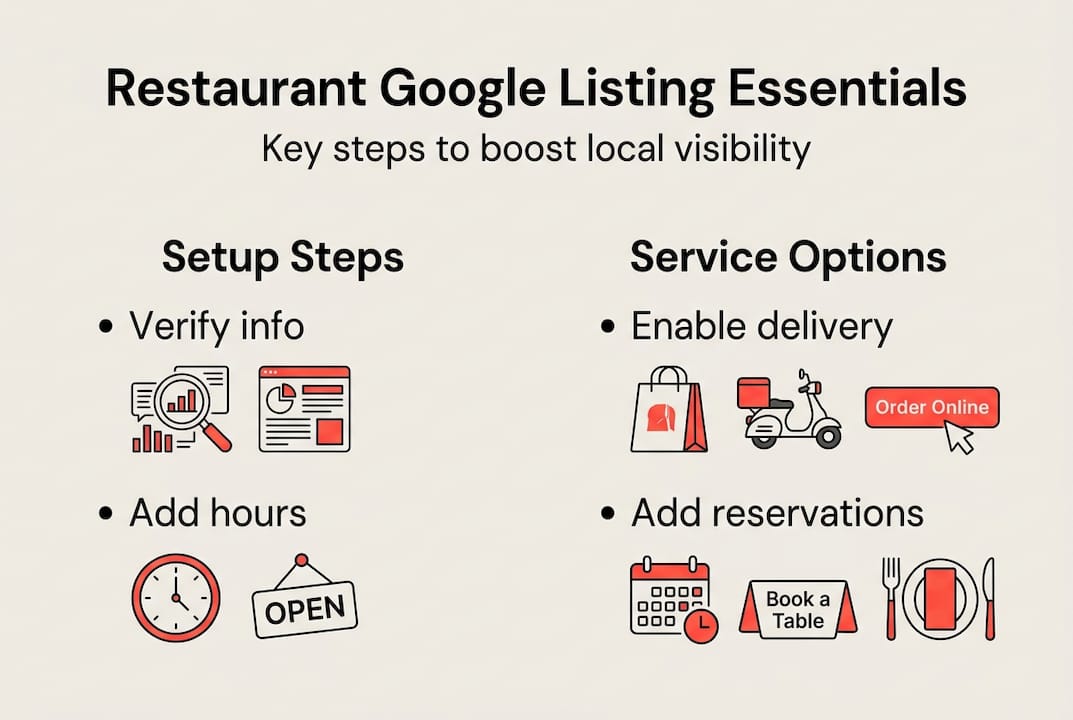
Verify your business to unlock editing capabilities and access performance insights. Verification proves you’re the legitimate owner and prevents unauthorized changes to your listing. Google sends a postcard with a verification code to your business address, though some locations qualify for instant verification through other methods.
Pro Tip: Set up special hours for every recurring event like trivia nights, live music, or extended weekend service. These details appear in search results and help customers plan their visit, reducing phone calls asking about your schedule. Explore more about restaurant Google My Business visibility to understand how these details impact your local search performance.
Adding menus, ordering, and reservations to drive customer actions
Menus transform your Google Business listing from a basic directory entry into a conversion tool. Customers want to see what you offer and how much it costs before deciding where to eat. Add menu using GBP editor or link, with prices and dish photos to give searchers the information they need to choose your restaurant.
Upload your complete menu directly through the Google Business Profile editor. Include prices for every item to set accurate expectations. Restaurants that hide prices create friction and lose customers who assume the food is overpriced. Add high-quality photos of your most popular dishes to make the menu visually appealing and help customers imagine their meal.
Alternatively, link to your website menu if you update it frequently or offer seasonal specials. This approach keeps your menu current without requiring constant Google Business updates. However, ensure the linked page loads quickly on mobile devices, as most customers search for restaurants on their phones. Check out restaurant menu examples to see how effective menu presentation influences customer decisions.
Enable Order with Google and connect with preferred delivery providers to capture customers ready to order immediately. This feature displays an “Order Online” button directly in your Google listing, reducing the steps between search and purchase. Connect with services like DoorDash, Uber Eats, or your own ordering system to give customers options.
Follow these steps to enable online ordering:
- Access your Google Business Profile and navigate to the “Food ordering” section
- Select your preferred ordering provider from the available integrations
- Add your restaurant’s unique ordering URL from the provider’s platform
- Test the ordering button by searching for your restaurant on Google and clicking through
- Monitor order volume through your provider’s dashboard to track performance
Integrate Reserve with Google using partners like Resy and OpenTable to streamline table bookings. Reservation buttons appear prominently in your listing, allowing customers to book without leaving Google. This convenience increases reservation rates, especially for customers comparing multiple restaurants.
Add UTM parameters to your booking links to track which reservations originate from your Google listing. This data helps you measure ROI and justify continued investment in profile optimization. Most reservation platforms support UTM tracking through their integration settings.
| Feature | Implementation Method | Primary Benefit |
|---|---|---|
| Menu display | Upload via GBP editor or link to website | Reduces decision friction and sets price expectations |
| Order with Google | Connect delivery provider accounts | Captures immediate order intent with one-click access |
| Reserve with Google | Integrate Resy, OpenTable, or similar platform | Increases table bookings by 15-25% through reduced booking steps |
| Menu photos | Upload high-res images of signature dishes | Increases engagement and helps customers visualize their meal |
Pro Tip: Update your menu seasonally and highlight limited-time offerings in your Google posts. This strategy keeps your listing fresh and gives returning customers a reason to check your profile regularly. Learn more through our step-by-step local SEO for restaurants guide for additional optimization tactics.
Effective review management for higher ratings and better reputation
Reviews directly influence whether potential customers choose your restaurant or a competitor. Request 3-5 reviews per week and respond within 24-48 hours to build social proof and demonstrate active engagement. Restaurants with higher review volume and ratings appear more prominently in local search results.

Develop a systematic approach to requesting reviews from satisfied customers. Train your servers to mention reviews during the payment process: “If you enjoyed your meal, we’d love to hear about it on Google.” Send follow-up emails or text messages with direct review links to customers who provided contact information. Make the process effortless by including a shortened URL that takes customers directly to your review page.
Respond to every review, positive or negative, within one to two days. Quick responses show potential customers you care about their experience and actively manage your restaurant. Positive review responses should be brief and genuine, thanking the customer for specific details they mentioned. Negative review responses require more care: acknowledge the issue, apologize sincerely, and offer to resolve the problem offline.
The restaurant industry average rating sits between 4.29 and 4.6 stars. Falling below 4.29 triggers customer hesitancy, as diners perceive your restaurant as below average. Maintain your rating above this threshold through consistent service quality and proactive review management. A single one-star review can significantly impact your average, especially for newer restaurants with fewer total reviews.
Key review management practices:
- Set up Google Business notifications to alert you immediately when new reviews arrive
- Create response templates for common feedback themes while personalizing each reply
- Track review sentiment over time to identify recurring service issues
- Highlight positive reviews in staff meetings to reinforce excellent service behaviors
- Address negative feedback constructively in team training sessions
Reviews also contribute to local search ranking through keyword relevance. When customers mention specific dishes, ambiance details, or service qualities in their reviews, Google associates those terms with your restaurant. This organic keyword integration improves your visibility for relevant searches without any action required from you.
“Responding to reviews isn’t just reputation management; it’s an opportunity to show potential customers how you handle feedback and care for your guests. Every response is a public demonstration of your restaurant’s values and commitment to excellence.”
Pro Tip: Create a simple spreadsheet to track review requests, response times, and rating trends. This data helps you identify patterns and measure the impact of service improvements on customer satisfaction. Discover more strategies for optimizing Google reviews for restaurants to build a stronger online reputation.
Maintaining and optimizing your listing for ongoing success
Your Google Business listing requires ongoing attention to maintain its competitive edge. Categories, posts, Q&A, and performance insights all contribute to your listing’s effectiveness. Primary category is the number one ranking factor, so selecting the right one dramatically impacts your visibility in local searches.
Choose your primary category carefully, as it tells Google what type of business you operate. A restaurant specializing in Italian cuisine should select “Italian Restaurant” rather than the generic “Restaurant” category. This specificity helps you appear in more relevant searches and compete against similar establishments rather than all restaurants in your area.
Add three to five secondary categories to capture additional search opportunities. A restaurant might select “Pizza Restaurant,” “Wine Bar,” and “Italian Grocery Store” if those services apply. Test different secondary category combinations and monitor your insights to see which ones drive the most profile views and customer actions.
Implement a monthly maintenance routine lasting approximately 45 minutes:
- Review and update business hours, including any upcoming holiday closures or special events
- Refresh your menu if you’ve added new items or changed prices
- Create at least one Google post highlighting current specials, events, or seasonal offerings
- Check your Q&A section and add answers to any new customer questions
- Analyze your Google Insights data to identify trends in how customers find and interact with your listing
- Compare your performance metrics to the previous month to spot improvements or declines
Seed your Q&A section with answers to common customer questions. Many restaurant owners overlook this feature, but it reduces phone calls and provides valuable information to searchers. Add questions about parking availability, dietary accommodations, group reservations, and dress code. Answer each question thoroughly but concisely, using natural language that includes relevant keywords.
Google posts keep your listing dynamic and give you a reason to share timely information. Announce special events, promote seasonal menu items, or highlight positive press coverage. Posts appear in your listing for seven days, so create them regularly to maintain a fresh presence. Include attractive photos and clear calls to action that encourage customers to visit or order.
Google Insights reveals how customers discover and interact with your listing. Monitor these metrics monthly:
- Search queries that led customers to your profile
- Total views and how they compare to competitors in your area
- Customer actions like website clicks, direction requests, and phone calls
- Photo views and which images generate the most engagement
- Peak times when customers search for your restaurant
Use this data to refine your optimization strategy. If most customers find you through searches for a specific dish, ensure that item appears prominently in your menu photos and posts. If direction requests spike on weekend evenings, consider creating posts that highlight your location and parking options during those times.
Pro Tip: Schedule your monthly maintenance for the same day each month to build consistency. Many restaurant owners choose the first Monday of the month when business is typically slower. This routine ensures your listing stays current without overwhelming your schedule. Explore restaurant marketing services to see how professional support can streamline your ongoing optimization efforts.
How Sorbey can help optimize your restaurant’s Google Business listing
Managing your Google Business listing effectively requires time, expertise, and consistent attention to detail. Many restaurant owners struggle to balance daily operations with the ongoing demands of digital marketing optimization. Sorbey specializes in restaurant marketing solutions that take this burden off your plate while maximizing your local visibility and customer engagement.
Our team handles every aspect of Google Business management, from initial setup and verification to ongoing optimization and review monitoring. We understand the unique challenges restaurants face in competitive local markets and develop customized strategies that align with your business goals. Whether you need help with menu presentation, review response templates, or monthly performance analysis, we provide the expertise to keep your listing performing at its peak.
Measure the impact of your marketing investments with our marketing ROI calculator, designed specifically for restaurant owners. Track how improvements to your Google Business listing translate into increased reservations, orders, and revenue. Access additional restaurant marketing tools and calculators to refine your local marketing strategies and make data-driven decisions about where to invest your marketing budget.
FAQ
How often should I update my Google Business listing for my restaurant?
Update your listing monthly at minimum, focusing on hours, menu changes, and fresh posts that highlight current offerings. More frequent updates during peak seasons or special events keep your information accurate and signal to Google that your listing is actively managed. Timely responses to reviews within 24 to 48 hours also count as engagement that benefits your listing’s performance.
What are the best attributes to highlight for a restaurant on Google Business?
Prioritize attributes that differentiate your restaurant and match common customer needs: outdoor seating, delivery options, wheelchair accessibility, and Wi-Fi availability. Include service-specific attributes like reservations accepted, good for groups, or late-night dining if they apply to your establishment. Select only attributes that accurately represent your offerings, as misleading information damages trust and leads to negative reviews.
Can I track the effectiveness of my Google Business reservations and orders?
Yes, add UTM parameters to your booking and ordering links to track conversions in Google Analytics. Google Insights also provides data on customer actions taken directly from your listing, including clicks to your ordering platform and reservation system. Reservation platforms like Resy and OpenTable offer their own analytics dashboards that show booking sources, helping you measure the specific impact of your Google Business integration.
Why is my restaurant not appearing in local search results despite having a Google Business listing?
Incomplete listings, inconsistent NAP information, or choosing overly broad categories often cause poor visibility. Verify your business, complete every available field, and ensure your primary category precisely matches your restaurant type. Building review volume and responding consistently also signals to Google that your business is active and relevant, improving your ranking in local search results.
Should I respond to positive reviews or only focus on negative feedback?
Respond to all reviews, both positive and negative, to demonstrate active engagement and appreciation for customer feedback. Positive review responses should be brief and genuine, thanking customers for specific details they mentioned. This practice shows potential customers that you value all feedback and maintain an active presence, which builds trust and encourages more people to leave reviews.
Recommended
- Google My Business: Boosting Restaurant Visibility Online | Sorbey Blog | Sorbey
- Google My Business : Booster la Visibilité des Restaurants en Ligne | Sorbey Blog | Sorbey
- Google My Business: Aumentando la Visibilidad de Restaurantes en Línea | Sorbey Blog | Sorbey
- Comment créer un business plan pour un restaurant ?
You might also like

Best Restaurant Loyalty Programs 2026: ROI Guide
Discover the best restaurant loyalty programs 2026 that boost repeat visits. Learn how Sorbey’s platform can transform your guest data strategy!

Why Mobile Marketing Matters for Business Growth
Discover why mobile marketing matters for business growth. Learn how optimizing for mobile drives traffic, conversions, and customer retention.

SF Dim Sum Restaurant Marketing Checklist for 2026
Transform your SF dim sum with our 2026 marketing checklist. Optimize your profile, showcase dishes, and attract customers fast!